



WasteLvlWaste money, level up
WasteLvl is a simple app that just records the money you have already spent. While budgeting apps manage both income and spending, WasteLvl only records the money you waste.
The waste you record becomes XP, and your adventurer grows with it.
Rather than holding back to save, keep a positive record of the money you have already spent. Record your waste like a game, and enjoy it.
A mobile app for iPhone, iPad and Android
use cases
- Convenience store snacks and coffee runs
- Food delivery and cleaning services
- Impulse purchases and online shopping
- Treating yourself and little luxuries
- In-game purchases, gacha, and fandom spending
- Drinks, after-parties, and taxi rides
- Travel, concerts, hobbies, and entertainment
- Unused subscriptions and gym memberships
perfect for
- You want to track nonessential spending and look back on it
- You feel guilty after spending money
- You're good at saving but find it hard to spend
- Traditional budgeting apps were too detailed to keep up with
- You want to look at spending in a more positive way
- You want tracking money to feel more like a game
- You like simple, lightweight apps
How to Use
Record it
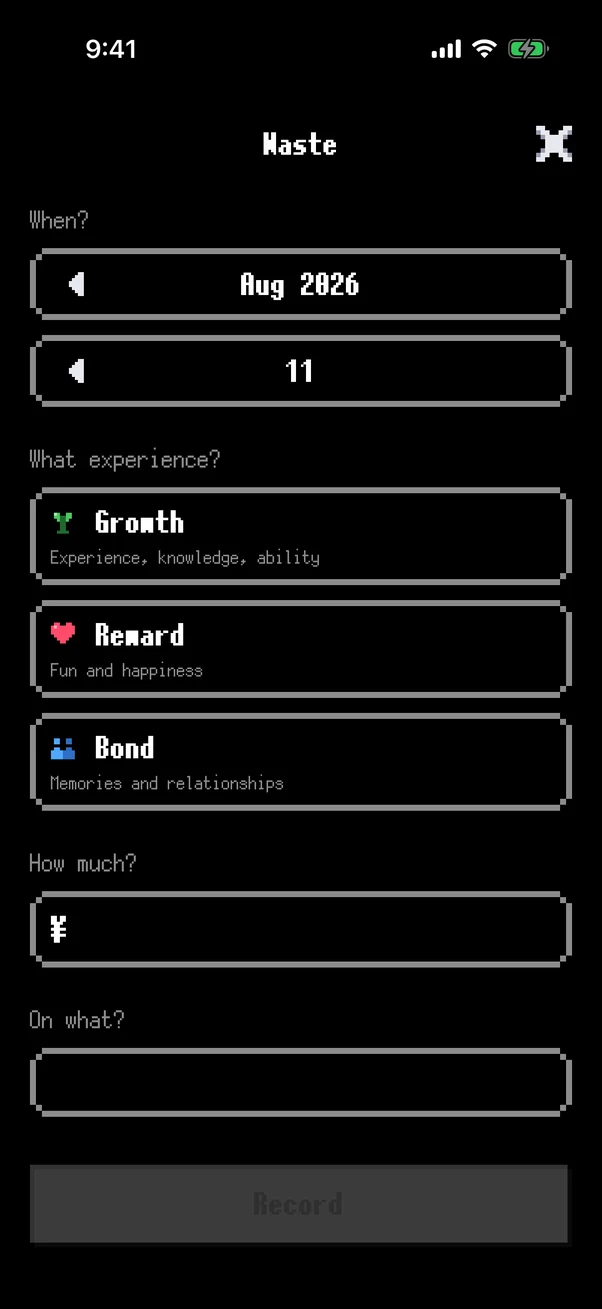
Enter four things: the date, the experience, the amount, and what you spent it on.
Level up
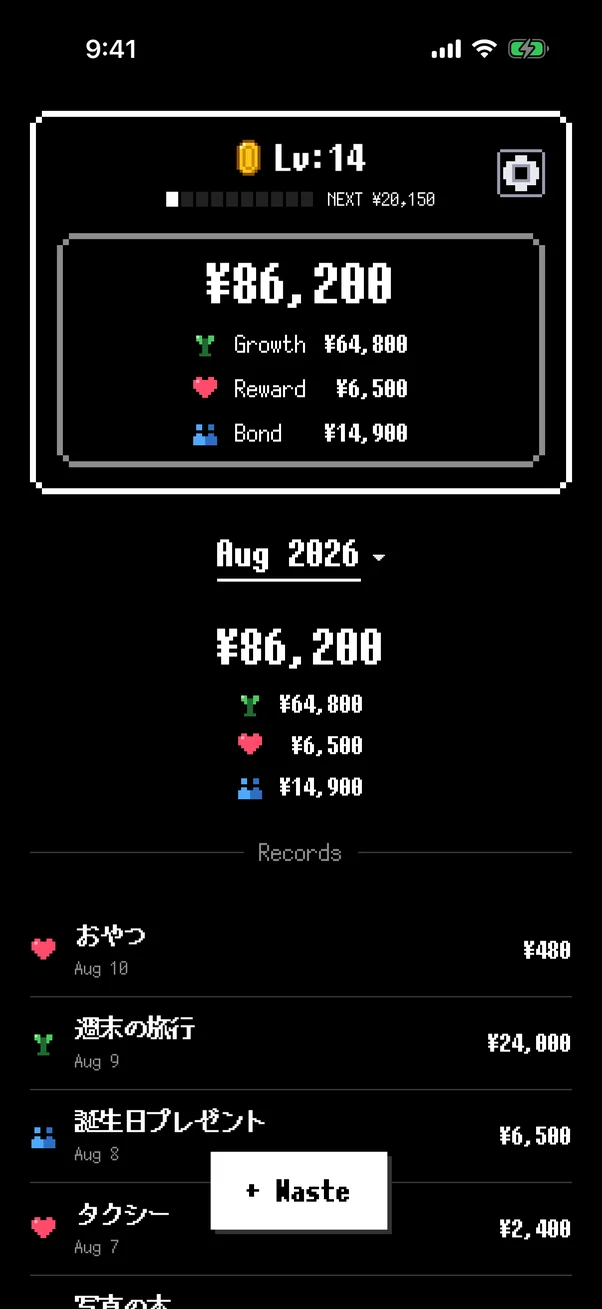
What you record becomes XP, and your level goes up as it adds up. Your adventurer changes as you gain experience.
Look back
Check your totals for all time, by month and by year, along with the breakdown by experience.
Open the Adventure Log
A pie chart, a day-of-week breakdown and your waste ranking reveal the patterns in your spending.
Features
Records
Just enter four things: the date, experience category, amount, and what you spent it on.
Experiences
You choose what you got out of the money.
・Growth (experience, knowledge, ability): New challenges, travel, studying, a new hobby, investing in yourself.
・Reward (fun, happiness): Snacks, eating out, hobbies, luxury, impulse buys.
・Bond (memories, relationships): Meals with friends, treating someone, gifts, time with family, time with your partner.
Adventure Log
One page that gathers everything you have recorded. A pie chart of how often each experience comes up, times and amounts side by side for every day of the week, and your three biggest wastes marked with gold, silver and bronze coins.
Patterns start to show — “I spend a lot on Wednesdays,” “weekends add up fast.”
Levels
Your spending becomes XP. See your progress toward the next level and your running total.
Your Adventurer
The traveller changes with the experiences you collect.
・Growth: your weapon is upgraded.
・Reward: your shield is upgraded.
・Bond: companions join you.
Statistics
View totals and breakdowns by experience category for all time, by month, or by year. Browse your past records anytime.
Filter
Tap a breakdown row in Statistics to show only that experience category. Tap it again to clear.
Custom Settings
Customize the appearance and behavior to suit your preferences.
・Sound: turn it on or off.
・Text size: choose from 8 sizes.
Currency and Language
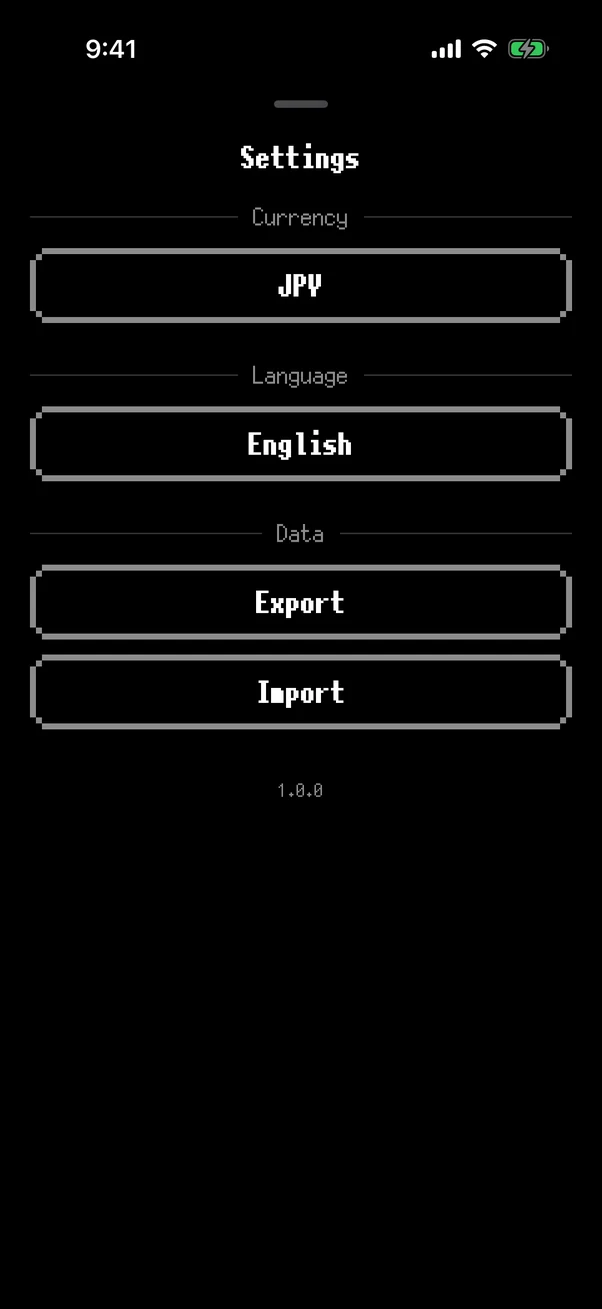
Supports 35 currencies and 47 languages. See the FAQ below for the full list. All records use a single currency for consistency, and if you switch currencies you can convert all your existing records at once.
You enter the conversion rate yourself. If rates were fetched automatically, your level would move up and down without you recording anything.
Sync & Backup
iPhone / iPad: turn on iCloud to automatically sync your data across your devices.
Android: works with Android Backup, so your data can be restored when you reinstall the app or set up a new device (there is no sync between devices).
Backup & Restore
Back up your data as a JSON file. Use it to restore your records or transfer them to another device.
Reset Data
Delete all your records from Settings and start over whenever you want.
Reviews
FAQ
Is WasteLvl free?
Yes, every feature is free. A banner advertisement is shown to support development.
How do levels work?
The spending you record becomes XP, and your level goes up as it adds up. You can see your progress toward the next level on the gauge in your profile.
Can I change the three experiences?
Growth (experience, knowledge, ability), Reward (fun and happiness) and Bond (memories and relationships) are fixed. You cannot add, delete or rename them, so there is nothing to deliberate over each time you record something.
A one-line description of all three is always on screen, and picking one reveals examples.
Is my data safe?
Yes. Your records are stored on your device and are never sent to the developer. We do not run a server, so we cannot read your records.
Amounts, titles, dates, and your level only leave the device through iCloud or Android Backup, or through a JSON file you export yourself.
Ads are delivered by Google AdMob; we request non-personalized ads only and do not track you across other apps or websites.
Which devices are supported?
iPhone, iPad, and Android.
On iPhone and iPad, turning on iCloud syncs your data automatically across devices.
On Android there is no sync between devices, but Android Backup is supported, so your data can be restored when you change phones or reinstall the app.
Which currencies and languages are supported?
35 currencies and 47 languages. The interface follows your device language setting. All records use a single currency for consistency, and if you switch currencies you can convert all your existing records at once.
Currencies: JPY, USD, EUR, GBP, CHF, CAD, AUD, CNY, TWD, HKD, SGD, KRW, INR, THB, VND, IDR, MYR, BRL, MXN, PLN, CZK, HUF, RON, SEK, NOK, DKK, TRY, RUB, UAH, ILS, SAR, AED, EGP, PKR, BDT
Languages: English, Japanese, Arabic, Bengali, Catalan, Chinese (Simplified), Chinese (Traditional), Croatian, Czech, Danish, Dutch, Finnish, French, French (Canada), German, Greek, Gujarati, Hebrew, Hindi, Hungarian, Indonesian, Italian, Kannada, Korean, Malay, Malayalam, Marathi, Norwegian (Bokmål), Odia, Polish, Portuguese (Brazil), Portuguese (Portugal), Punjabi, Romanian, Russian, Slovak, Slovenian, Spanish, Spanish (Mexico), Swedish, Tamil, Telugu, Thai, Turkish, Ukrainian, Urdu, Vietnamese
Featured On